

The CLASSLA-web corpora are a collection of text from the internet, its newest version covering seven South Slavic languages:
- Slovenian
- Croatian
- Bosnian
- Montenegrin
- Serbian
- Macedonian
- Bulgarian
The second version of the CLASSLA-web corpus collection substantially expands the original release, growing from 13 billion tokens and 26 million documents to more than 17 billion words and 38 million documents. It currently represents the largest general corpus available for each of the seven South Slavic languages. In the case of Macedonian, it is also the first linguistically annotated general corpus for the language.
The corpora were developed by the CLASSLA Knowledge Centre for South Slavic languages, which is officially operated by CLARIN.SI. They are built on text data collected by crawling primarily the national top-level internet domains (e.g. “.si” for Slovenian, “.hr” for Croatian, “.rs” for Serbian), capturing everything from news articles and legal documents to personal blogs and online forums.
Additionally, each corpus is enriched with multiple layers of information, including linguistic annotations, genre metadata and topic classifications.
Annotation layers of CLASSLA-web
- Linguistic annotation – tokenization, lemmatization and morphosyntactic tagging
- Genre – e.g. News, Forum, Legal, Promotion, Opinion
- Topic – e.g. Sport, Environment, Politics, Health (version 2.0 only)
This makes it appropriate for studying non-standard language, domain-specific vocabulary, genre variation or cross-linguistic comparisons across South Slavic languages, making it especially interesting for researchers, students and enthusiasts in linguistics, digital humanities, corpus linguistics, language teaching and more.
Follow along this easy tutorial if you want to learn how to navigate on NoSketchEngine using the CLASSLA-web corpora.
1. Access CLASSLA-web
1.1 Register on NoSketchEngine (optional for basic use)
The CLASSLA-web corpora are freely accessible through the CLARIN.SI NoSketchEngine concordancer, which provides a variety of analysis tools. For basic corpus browsing and querying, you can use the standard NoSketchEngine interface without registering. However, some advanced features used later in this tutorial, such as creating your own subcorpora, require a free NoSketchEngine Log (skelog) account. To use these features, create a free account at https://www.clarin.si/skelog/#unauthorized (make sure to enable pop-up windows in your browser). The registration is straightforward:
Your credentials cannot be retrieved if forgotten. Make sure to store them safely.
- Click “Sign up now”, define your username and password and confirm by clicking “Register”.
- There will be no confirmation message.
- Return to https://www.clarin.si/skelog (again with pop-ups enabled) and log in with the credentials you just created.
- If you run into any problems during registration or login, contact info@clarin.si.
The NoSketchEngine concordancer offers valuable tools for web language analysis which can serve as the basis for many use cases. The following tutorial explores the most important tools and offers a general hands-on experience for anyone new to corpus linguistics with no or limited background in programming.
1.2 Select a corpus
Once you are logged in, you will land on the NoSketchEngine dashboard (Fig. 1).
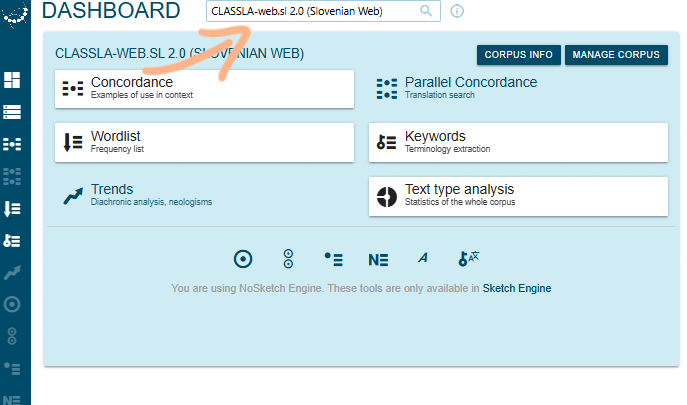
Choose the corpus you want to work with by clicking on the search box at the top of the page and either scrolling through the list or typing directly “CLASSLA-web.” followed by the country code. The available CLASSLA-web corpora are:
CLASSLA-web.sl– SlovenianCLASSLA-web.hr– CroatianCLASSLA-web.bs– BosnianCLASSLA-web.cnr– MontenegrinCLASSLA-web.sr– SerbianCLASSLA-web.mk– MacedonianCLASSLA-web.bg– Bulgarian
The CLASSLA-web corpora are currently available in two versions, differing mainly in the time span of the web-crawling:
- Version 1.0: 2021–2022 (11 bn. words, 26M texts)
- Version 2.0: 2024 (17 bn. words, 38M texts)
💡 Tip
The two versions share only about 20% of texts, which means they can also be used together for an even larger dataset if needed.
For this tutorial, choose the Slovenian CLASSLA-web.sl 2.0 corpus.
1.3 Understanding the data
Once you have selected your corpus, navigate to “Corpus Info” on the left sidebar to explore the structure of the dataset (Fig. 2).
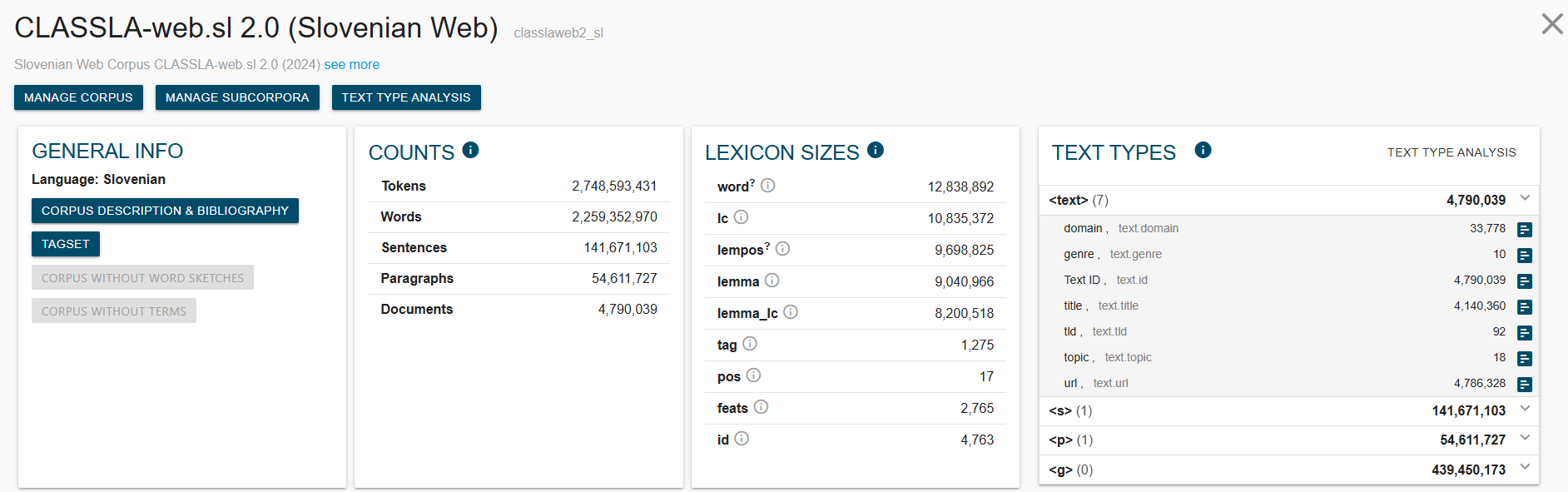 Fig. 2 – Corpus Info with Text Types
Here you get an overview of the size of the corpus, as well as a list of “Text types”, the annotated metadata categories you can filter on. Each corpus comes with basic metadata, including the web domain and URL of the source text (e.g. “rtvslo.si” for texts from the Slovene national broadcaster) and script (Latin or Cyrillic) for the Serbian, Bosnian and Montenegrin corpora. Beyond this, each corpus is enriched with three additional annotation layers:
- Linguistic annotation – via the CLASSLA-Stanza pipeline, providing tokenization, lemmatization and morphosyntactic tagging
- Genre metadata – via the multilingual X-GENRE classifier, covering nine categories such as News, Promotion, Opinion/Argumentation, Forum and Legal
- Topic metadata – via a multilingual IPTC news topic classifier, covering 23 labels such as Politics, Health, Crime/Law and Justice, Science and Technology, Sport and Environment (available in version 2.0 only)
Because all seven corpora were collected and processed using the same tools, within the same time frame, and annotated with the same classification systems, findings across languages can be directly compared without methodological inconsistencies.
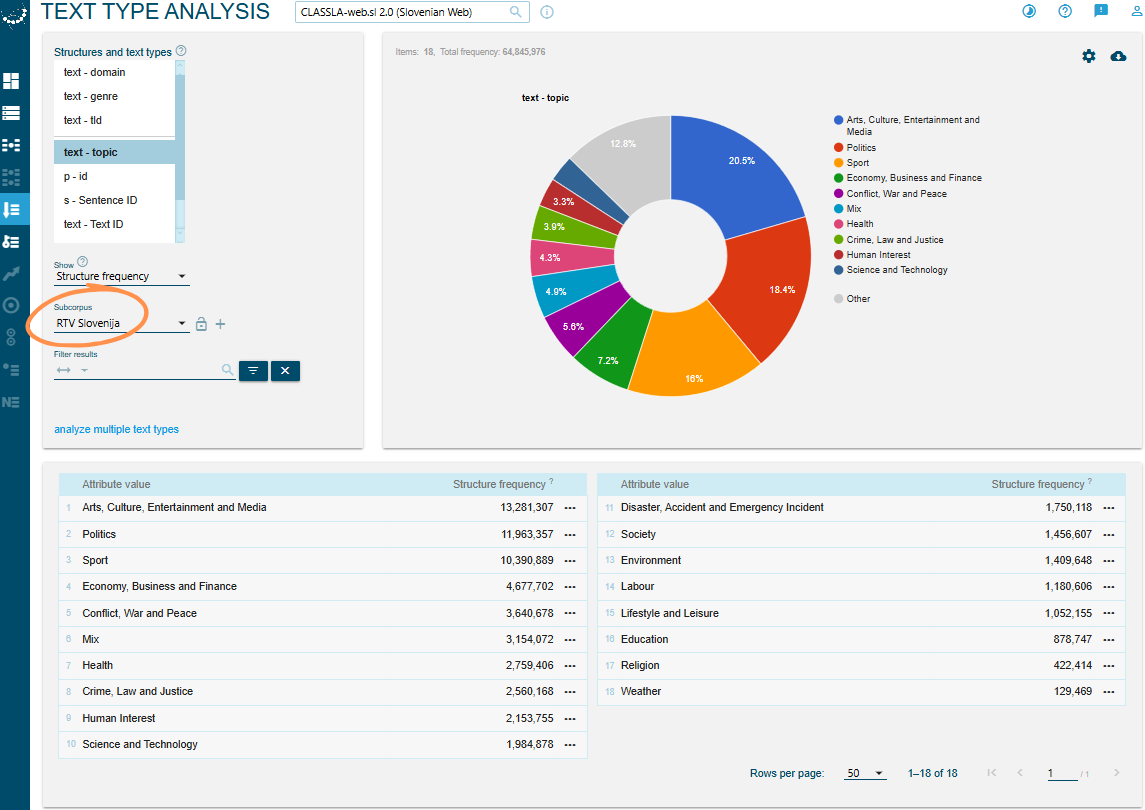
To get a feel for the data, click on “Text type analysis” (Fig. 3), which gives you a general distribution overview of the metadata values.
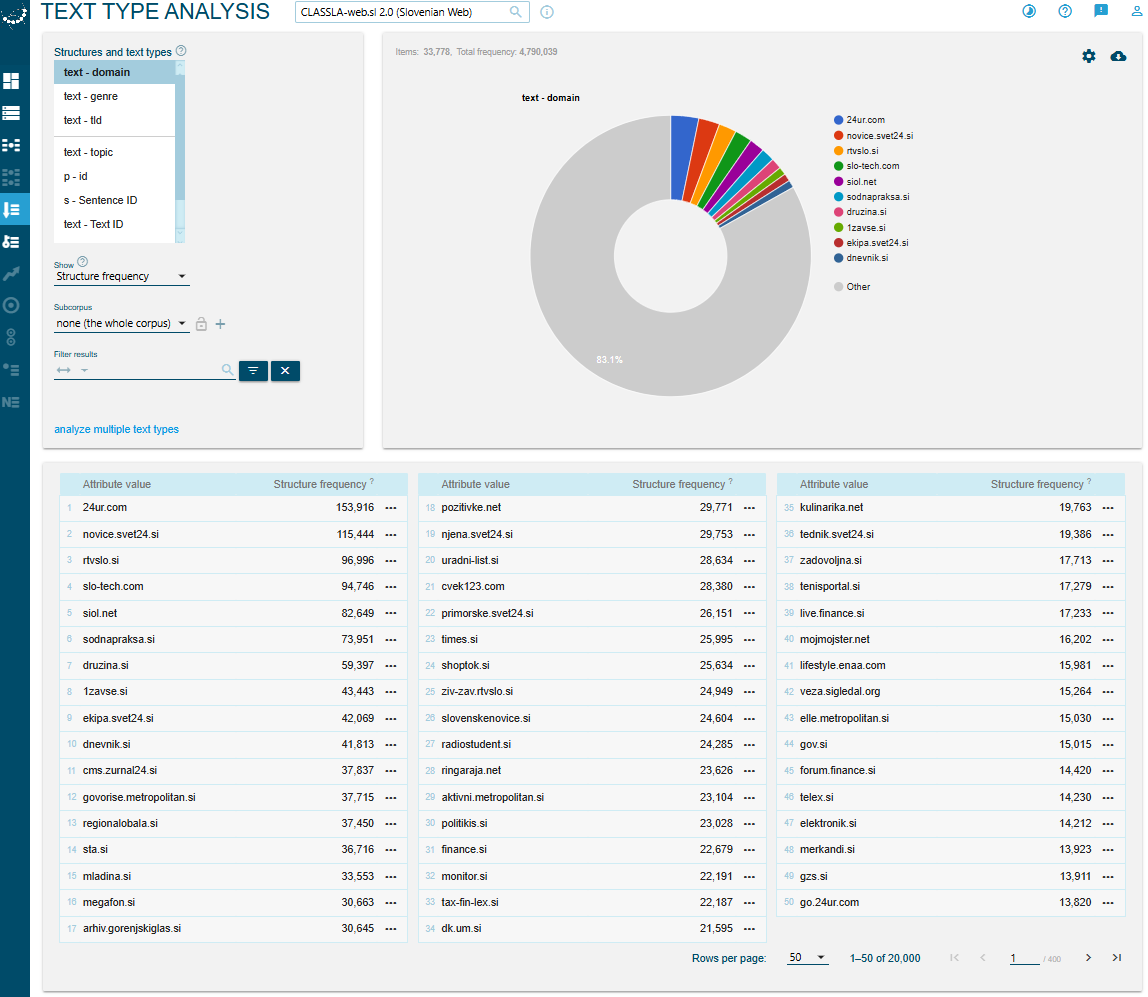
In Fig. 4, for example, you can see the topic distribution in the subcorpus “RTV Slovenija”, created by filtering for the domain rtvslo.si.
For many use cases, it is a good idea to create a subcorpus. That is a filtered subset of the main corpus. Filtering by a specific topic, genre, or domain allows you to get more targeted results and enables meaningful comparisons. You will learn how to do this in the next section.
2. Filtering
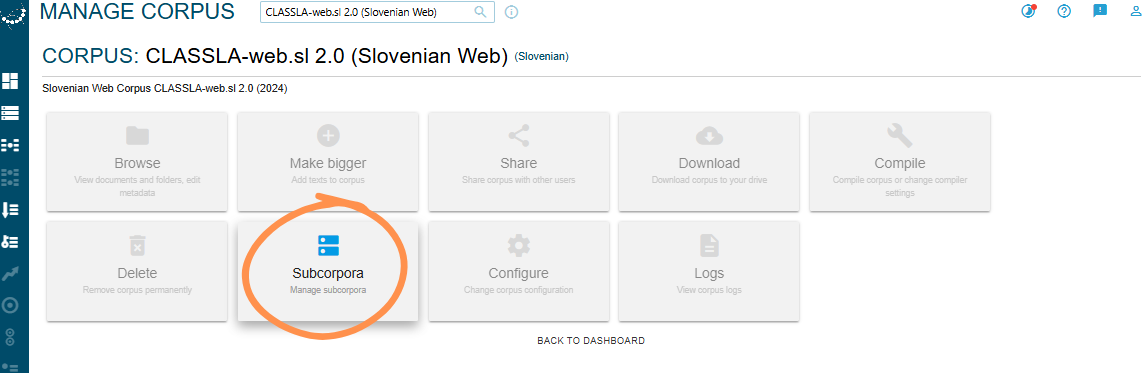
To create a subcorpus, click on “Manage corpus” on the main Dashboard (Fig. 1), then on “Subcorpora” (Fig. 5) and “Create Subcorpus” (Fig. 6).
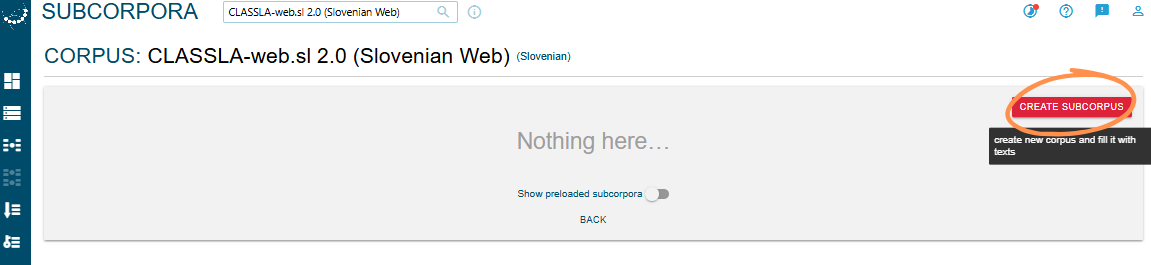
This takes you to an interface where you can choose your filters and give your subcorpus a name.
Depending on your interest, you can select one or several criteria, including topic (e.g. Health, Politics), genre (e.g. News, Forum), or domain name (e.g. 24ur.com). Combining multiple filters is possible and allows for more targeted analyses.
Tip
Keep in mind that genre distribution is not equal across the CLASSLA-web corpora. News is by far the dominant genre in most of them.
For this tutorial, we will create two subcorpora:
(1) Mladina.si News (Fig. 7):
- Genre = News
- Domain = mladina.si
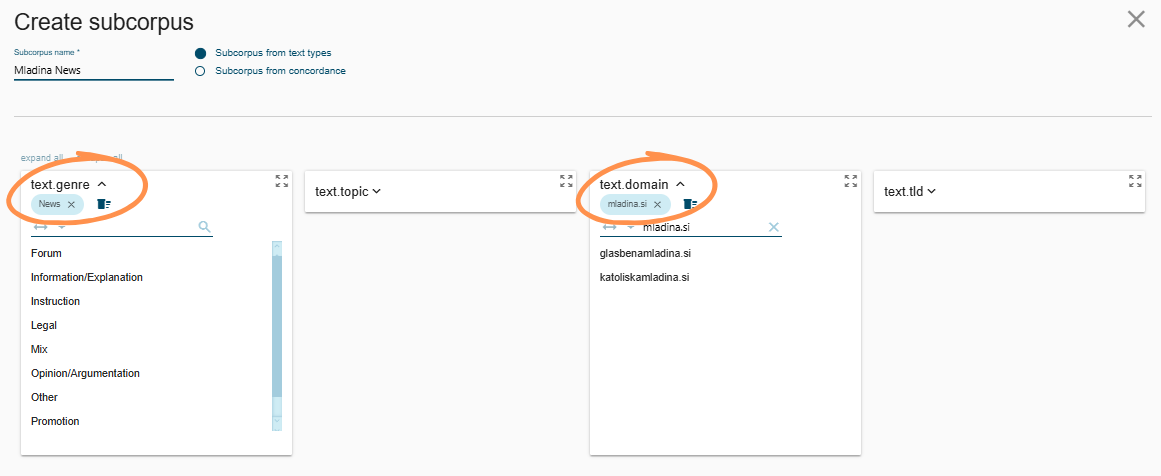
Fig. 7 – Mladina.si News filter
(2) Družina.si News (Fig. 8):
- Genre = News
- Domain = druzina.si
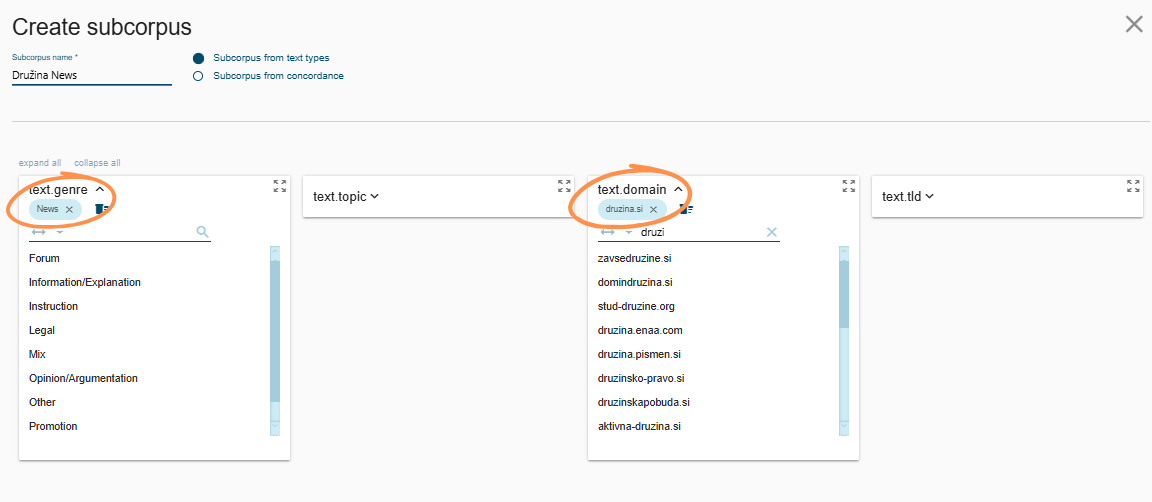
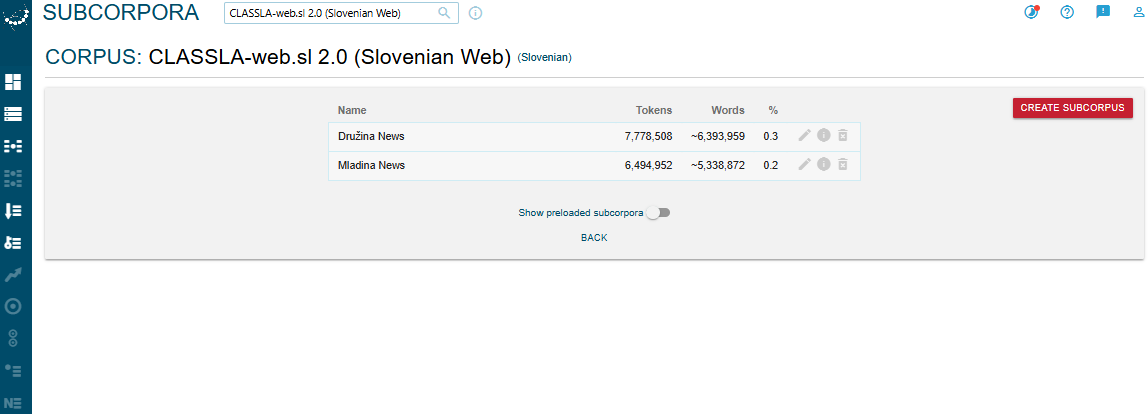
Each subcorpus is filtered to the News genre only: one containing texts from Mladina.si, a left-liberal news outlet, and one from Družina.si, a Catholic broadcaster. Filtering by News ensures we are comparing within the same genre, rather than mixing editorial content with promotional or forum content. The two subcorpora are similar in size (Fig. 9).
Using the two subcorpora that we just created, we will investigate the following question:
Research question
What differences in vocabulary can be observed between the left-leaning news outlet Mladina (mladina.si) and the Catholic weekly Družina (druzina.si)? What do the most distinctive keywords and most frequent words reveal about how each source covers the news?
3. Keywords
A word is considered a keyword when it is statistically overrepresented in a focus corpus compared to a reference corpus, meaning it appears more often than we would expect by chance. NoSketchEngine measures this using log-likelihood, a statistical metric that indicates how significant the difference in frequency is between the two corpora. Rather than simply comparing raw frequencies, log-likelihood takes into account the size of both corpora and asks: how probable is it that this difference in frequency occurred by chance alone? The higher the score, the more confident we can be that a word genuinely characterises the focus corpus.
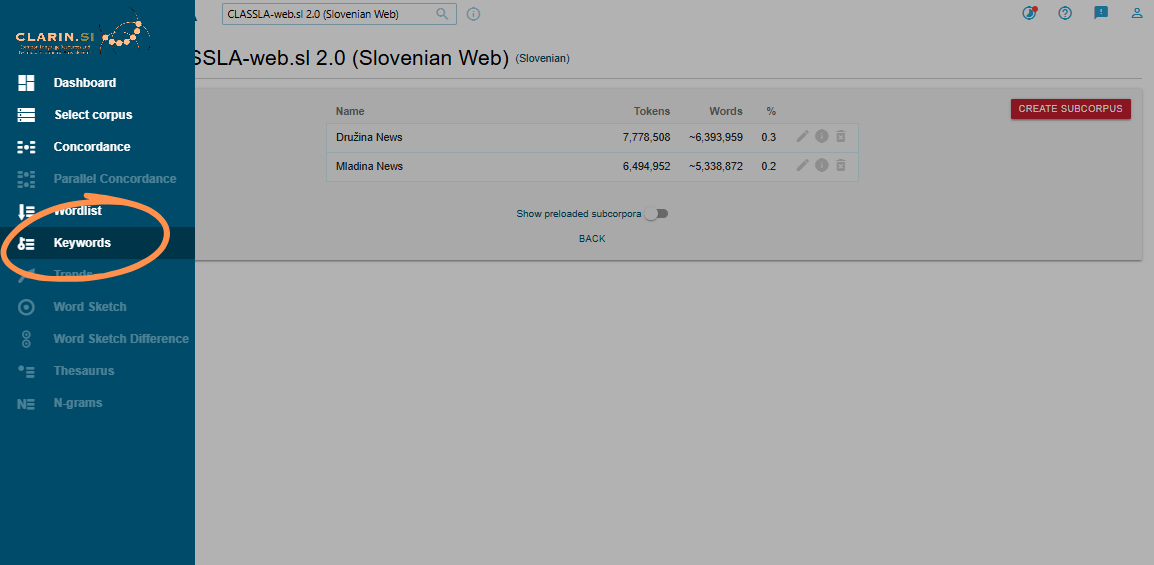
The Keywords tool (accessible from the main menu or from the sidebar, Fig. 10) compares different corpora to find words that appear unusually frequently in one compared to the other(s), in other words, words that are specific to the focus corpus.
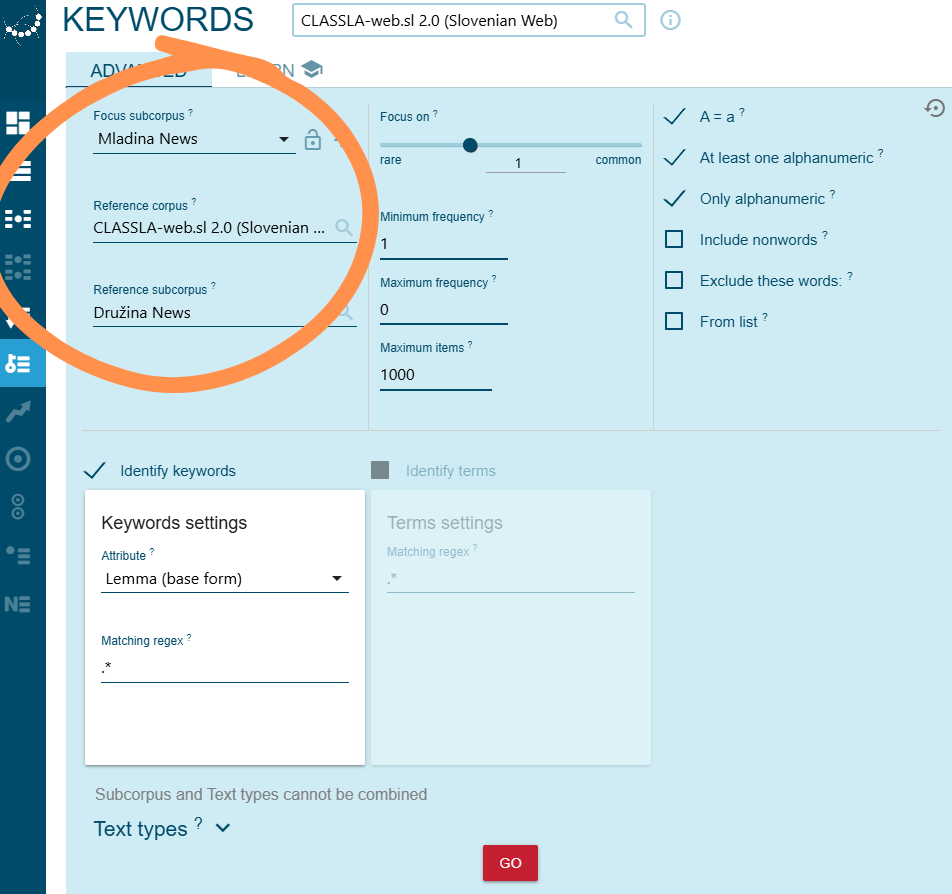
To find keywords characteristic of the Mladina News subcorpus, compared to both the full CLASSLA-web.sl 2.0 corpus and the Družina News subcorpus, select the options shown in Fig. 11.
This search will generate a list of 1,000 key-lemmas (Fig. 12).
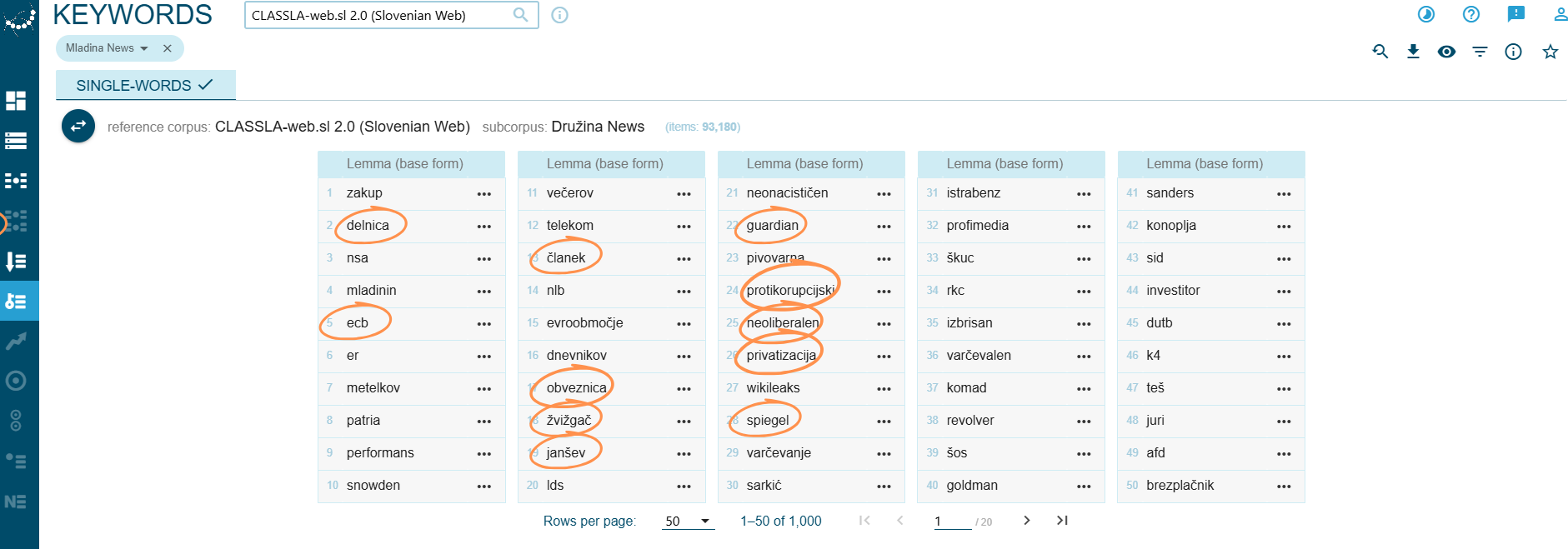
This keyword list is heavily packed with vocabulary about media, finance and politics. It also contains several proper nouns, some pointing to specific scandals, others referencing famous individuals or news magazines. These thematic clusters suggest that Mladina is strongly oriented towards political, economic and media topics.
Insight into Mladina.si’s Keyword Glossary
Media
članek– articleguardian– The Guardian (British newspaper)spiegel– Der Spiegel (German news magazine)
Finance
delnica– share / stockecb– ECB (European Central Bank)obveznica– bond (financial)privatizacija– privatisation
Politics
janšev– relating to Janez Janša (Slovenian politician)žvižgač– whistleblowerneoliberalen– neoliberalprotikorupcijski– anti-corruption
Proper nouns
TEŠ– Šoštanj Thermal Power Plant (major financial scandal)Snowden– Edward Snowden (NSA whistleblower)Spiegel– Der Spiegel (German investigative news magazine)
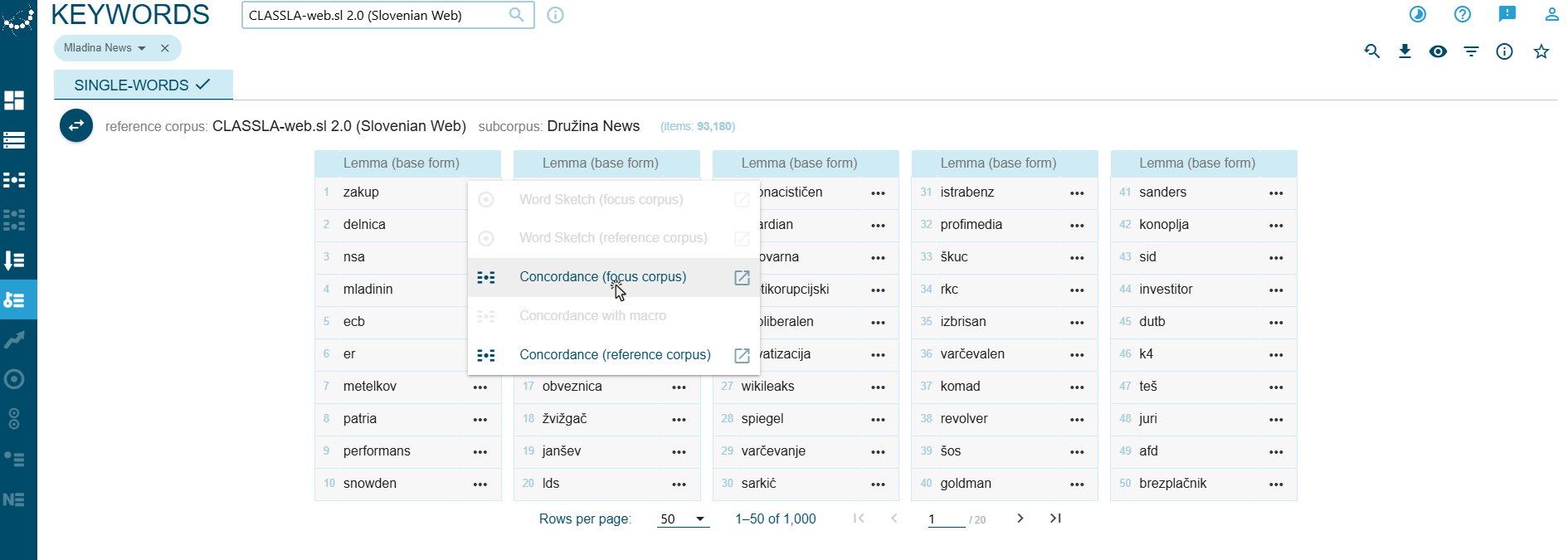
To explore any lemma further, click the three dots next to it and select “Concordance (focus corpus)” (Fig. 13).
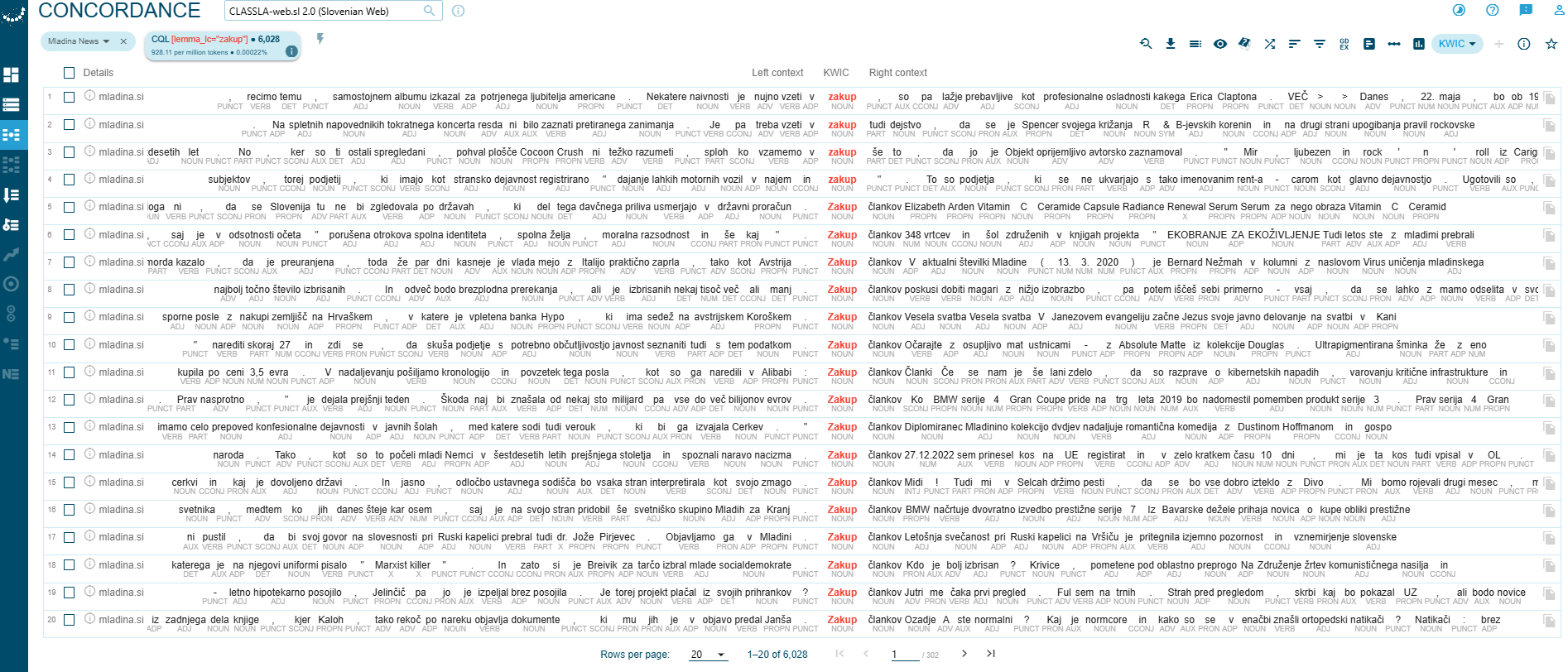
This displays every occurrence of the selected term in the corpus alongside its surrounding context, the source of each instance and the total frequency count (see Fig. 14).
If we swap the subcorpora so that Družina News becomes the focus corpus, the resulting keyword list looks very different (Fig. 15). These 1,000 keywords are again lemmas, but they almost exclusively represent religious vocabulary, specifically Catholic terms and practices (Vatican, jubilant, župnijski). Financial and political vocabulary is almost completely absent.
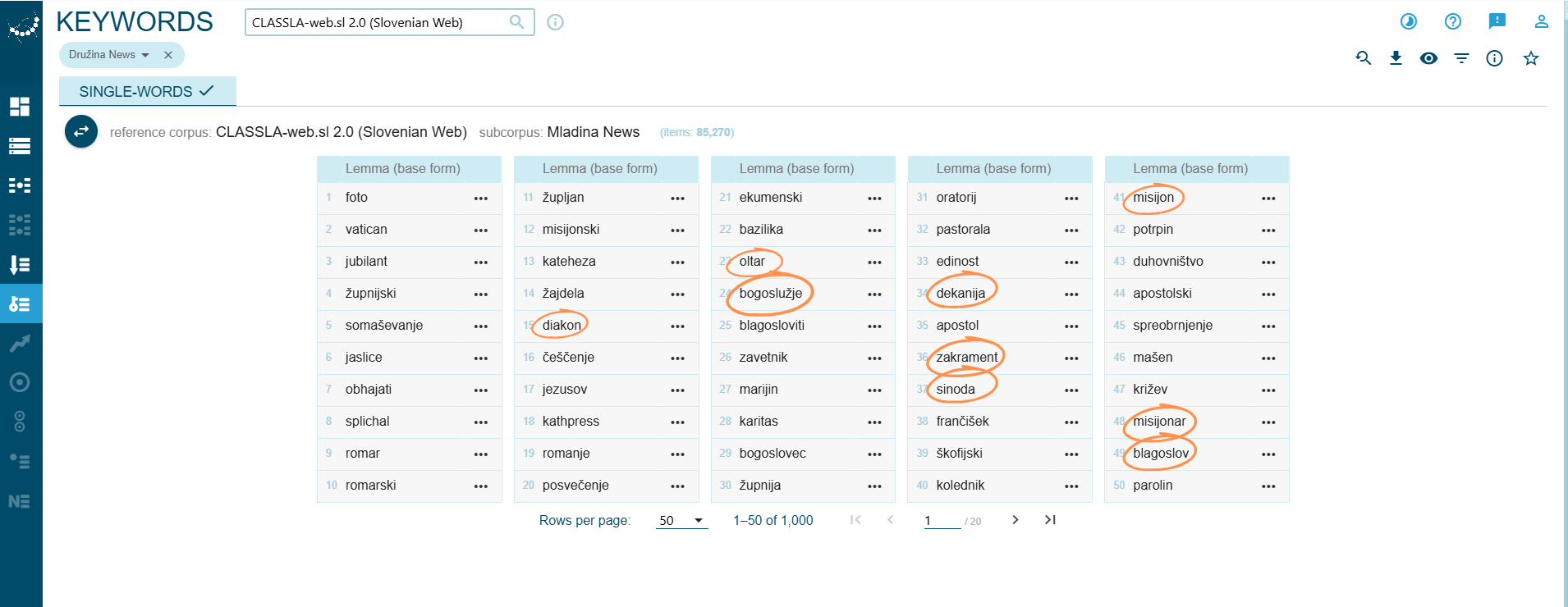
Insight into Druzina.si’s Keyword Glossary
bogoslužje– liturgyzakrament– sacramentoltar– altarblagoslov– blessingčeščenje– veneration
Church structure & community
župnija– parishdekanija– deanerydiakon– deaconsinoda– synodbogoslovec– theology student
Mission & pilgrimage
misijon– missionmisijonar– missionaryromanje– pilgrimageromar– pilgrim
Proper nouns
frančišek– Francis (Pope Francis)parolin– Parolin (Vatican Secretary of State)kathpress– KathPress (Austrian Catholic news agency)
With just a few clicks, we have now established that mladina.si and druzina.si occupy very different thematic spaces: Mladina is dominated by political and economic debate, while Družina is focused on religion and Catholic practice.
🔍 Keywords & Regex
To narrow down keyword results by part of speech, change the attribute in the keyword settings from Lemma (base form) to Lemma with PoS tag and apply one of the following regex patterns:
.*-v(verbs only).*-n(nouns only).*-a(adjectives only)
Verbs can be particularly revealing because they are words of action. They tell us what is happening in the texts rather than just what topics are mentioned. Filtering by part of speech also helps reduce noise in the keyword list, which can otherwise be dominated by proper nouns or function words. By isolating verbs, nouns, or adjectives separately, we get a more focused and interpretable picture of how a corpus is distinctive.
4. Conclusion
This tutorial has walked you through the core steps of corpus analysis using the CLASSLA-web corpus and NoSketchEngine:
- Setting up subcorpora
- Generating keyword lists
- Interpreting frequency patterns
The comparison between Mladina and Družina has shown how just a handful of tools can quickly reveal meaningful differences in vocabulary and thematic focus between two news websites. These findings are just a starting point. But the same workflow can be applied to any combination of subcorpora, languages or genres that are available in CLASSLA-web. Of course, you can also adapt the pipeline to a variety of research questions: from researching political discourse to studying genre variation or cross-linguistic comparisons. There is plenty more to explore!
